Thursday, May 3, 2018

Oracle Web ADI Excel and IE Setups

There are few important setups that needs to be done in Microsoft Excel and Internet Explorer (IE) to work with Oracle Web ADI. Please make sure to have the below setups done before testing a Web ADI otherwise you might encounter with Run time errors while opening the excel sheets.

Excel Setups:


1. Open Excel and go to File --> Options
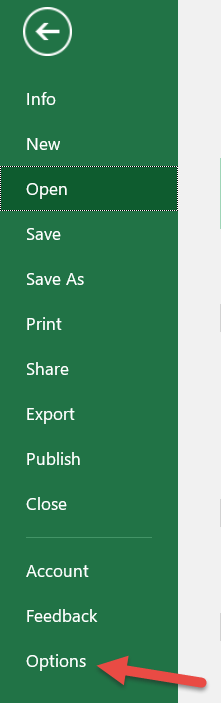


2. From Trust Center click on Trust Center Settings...


3. Select Macro Settings from the left navigation pane. 
   a) Under Macro Settings section select "Enable all macros
   b) from Developer Macro Settings check the 
      "Trust access to the VBA project object model"  and click OK

4. Under the Protected View uncheck the below two protected view options


Click OK and exit Excel.

Internet Explorer (IE) Setups:


1. Open IE and select Tools --> Internet Options
    Then click on the "Security" tab and click on the "Custom level..."


2. Scroll down to Scripting section and then
    Enable the Allow status bar updates via script option.


Click OK button. 

Close IE and Re Open to test the Web ADI documents. 


Thursday, April 12, 2018

ALTER SESSION SET CURRENT_SCHEMA


You can use below command to avoid the use of public synonyms.  By setting the current_schema attribute to the schema owner name it is not necessary to create public synonyms for production table names

ALTER SESSION SET CURRENT_SCHEMA = "XX_SCHEMA_NAME"

Ex:  ALTER SESSION SET CURRENT_SCHEMA = "APPS"

Queries to Check Oracle Application and Database Versions

Application Version:

SELECT RELEASE_NAME, APPLICATIONS_SYSTEM_NAME, ARU_RELEASE_NAME FROM apps.fnd_product_groups

Database Version:

 SELECT * FROM v$version

Thursday, November 9, 2017

Grant script to grant Tables, Views and packages to other schema in Oracle Apps R12.2.X

From Oracle R12.2.X release we can use the below Oracle recommended API/package to give grants on objects in APPS schema

exec AD_ZD.GRANT_PRIVS( X_PERMISSIONS ,
                                                    X_OBJECT_NAME,
                                                    X_GRANTEE ,
                                                    X_OPTIONS,
                                                    X_GRANT_TO_TABLE)

  • X_PERMISSIONS:- refer to permissions to be granted like SELECT, INSERT, EXECUTE etc.
  • X_OBJECT_NAME:- refers to the object name from APPS schema for which Grants would be given. Like the table name, view name. package name etc.
  • X_GRANTEE: Refers to Grantee or schema to which grants would be given. Like Custom schema
  • X_OPTIONS: Refers to Grant option, Default value is NULL
  •  X_GRANT_TO_TABLE:
1.   This parameter is applicable only when the target object on which the grant needed is EV.
2.   This parameter decides whether permission to be granted on the underlying table also
  • Values cane passed are: TRUE(default): Grant permission on EV and its underlying table, FALSE: Grant permission to EV only.

Below are few examples for granting SELECT on table and EXECUTE On package:

-- Grant Select on Custom Table
BEGIN
/* First three parameters are passed and other two are Default values*/
   AD_ZD.GRANT_PRIVS ('SELECT',
                            'XX_CUST_TABLE',
                            'XXSCH');
END;

-- Grant Execute on Custom Package
BEGIN
/* First three parameters are passed and other two are Default values*/
   AD_ZD.GRANT_PRIVS ('EXECUTE',
                            'XX_CUST_PKG',
                            'XXSCH');
END;

Wednesday, October 25, 2017

Query to derive Basic Information for Oracle PN (Property Management) Leases

SELECT lease.lease_num lease_number,
       lease.NAME lease_name,
       lease.lease_class_code,
       hou.NAME operating_unit,
       tower.location_code site_number,
       tower.building site_name,
       lease.lease_type_code,
       lease.lease_status,
       lease.status,
       detail.lease_execution_date execution_date,
       detail.lease_commencement_date commencement_date,
       detail.lease_termination_date termination_date,
       tower.lease_or_owned,
       tower.CLASS,
       address.county,
       address.state,
       address.country,
       address.zip_code
  FROM pn.pn_leases_all lease,
       pn.pn_lease_details_all detail,
       apps.hr_operating_units hou,
       apps.pn_tenancies_all tenancies,
       apps.pn_locations_all locations,
       apps.pn_locations_all tower,
       apps.pn_addresses_all address
 WHERE     1 = 1
       AND lease.lease_id = detail.lease_id
       AND tenancies.primary_flag(+) = 'Y'
       AND lease.org_id = hou.organization_id
       AND lease.lease_id = tenancies.lease_id
       AND tenancies.location_id = locations.location_id
       AND locations.PARENT_LOCATION_ID = tower.location_id
       AND tower.address_id = address.address_id

Query to find Concurrent Program Executable

SELECT fcpt.user_concurrent_program_name,
       fcp.CONCURRENT_PROGRAM_NAME,
       fe.execution_file_name,
       eflv.meaning execution_method
  FROM apps.fnd_concurrent_programs_tl fcpt,
       apps.fnd_concurrent_programs fcp,
       apps.fnd_executables fe,
       apps.fnd_lookup_values eflv
 WHERE     1 = 1
       AND fcpt.concurrent_program_id = fcp.concurrent_program_id
       AND fcp.executable_id = fe.executable_id
       AND fe.execution_method_code = eflv.lookup_code
       AND eflv.language = 'US'
       AND eflv.lookup_type = 'CP_EXECUTION_METHOD_CODE'
       AND fcpt.user_concurrent_program_name LIKE '%XX%'

Wednesday, September 27, 2017

Script to create Oracle User account from Backend

DECLARE
   v_user_id   NUMBER;
BEGIN
   v_user_id :=
      fnd_user_pkg.createuserid (x_user_name              => 'FIRSTNAME.LASTNAME',
                                 x_owner                  => 'X',
                                 x_unencrypted_password   => 'welcome',
                                 x_description            => ' ',
                                 x_start_date             => SYSDATE);

   fnd_user_resp_groups_api.insert_assignment (
      user_id                         => v_user_id,
      responsibility_id               => 20420,  -- SYSADMIN Responsibility ID
      responsibility_application_id   => 1,         -- SYSADMIN APPLICATION ID
      start_date                      => SYSDATE,
      end_date                        => NULL,
      description                     => NULL);
   COMMIT;
   DBMS_OUTPUT.put_line (
      'Successfully created user and assigned Sysadmin responsibility');
EXCEPTION
   WHEN OTHERS
   THEN
      ROLLBACK;
      DBMS_OUTPUT.put_line (SQLERRM);
END;
/

SQL Query to Find Oracle Web ADI Importer Package Procedure Name

 SELECT ba.attribute2     wed_adi_package_procedure_name   FROM apps.bne_attributes      ba,        apps.bne_param_lists_b   bplb,        ap...